AI Takeoff Software for Contractors: A Practical Guide
Sami·Founder, Platineer··17 min read
AI takeoff software can compress manual quantity extraction from 40 to 60 hours down to 6 to 8 hours per project, and some reported runs completed a full-plan takeoff in 12 minutes while cutting manual hours by 90%. It's most reliable on clean architectural and structural PDFs, where reported performance often lands within about 2% to 4% of a careful manual takeoff, but it still needs estimator review on messy sheets and complex scopes.
If you're staring at a bid board with more opportunities than estimating hours, that's the reason this category matters. The win isn't just speed for its own sake. The win is getting quantities early enough to price properly, chase quotes, catch scope holes, and submit before your team gets forced into another late-night scramble.
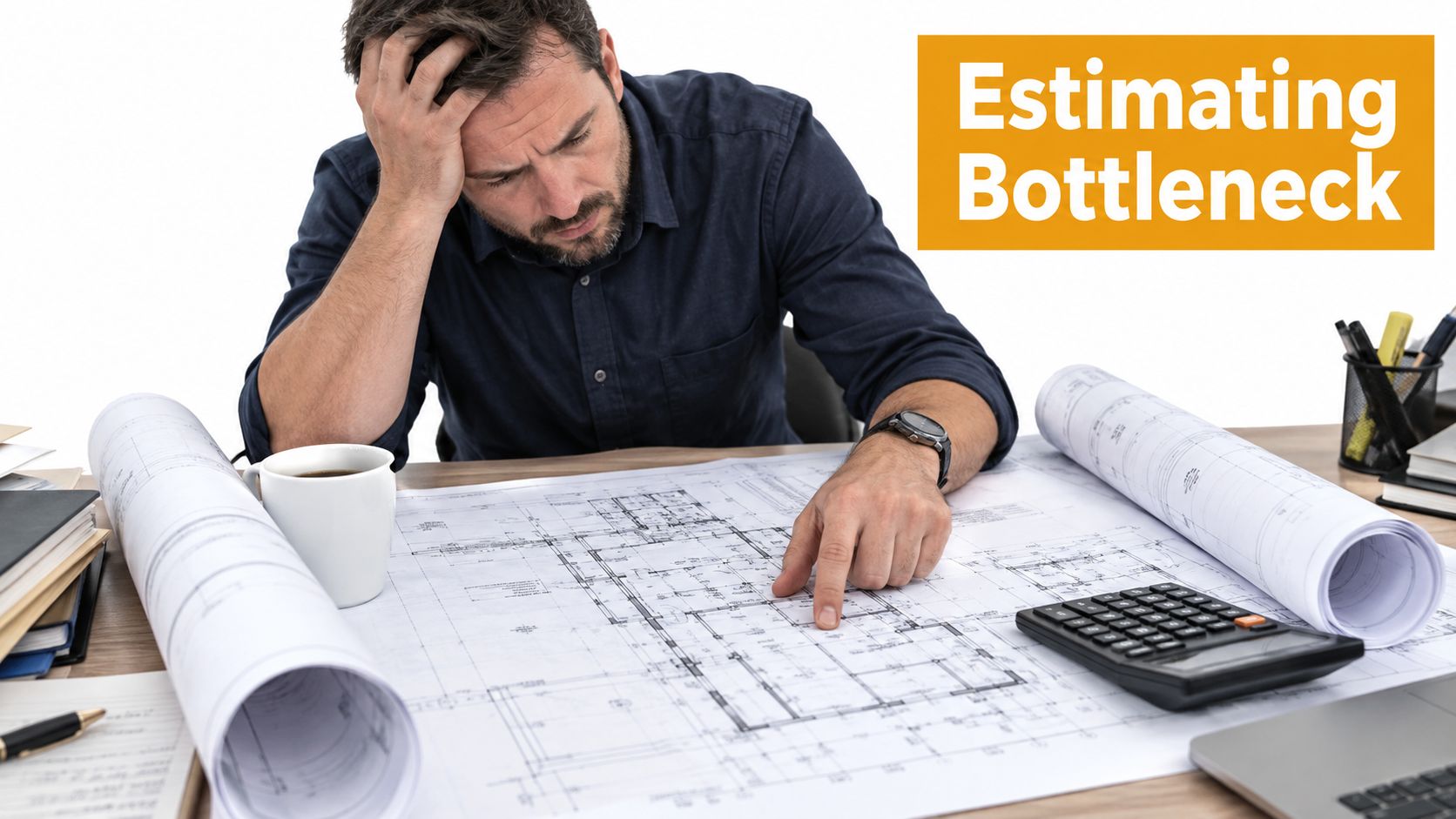
By 8:15 on Monday, the estimating desk is already upside down. A warehouse package lands first. Then a tenant finish-out. Then a revised set on a job that was already due Wednesday. Before anyone talks to vendors or sharpens exclusions, the day is spent opening PDFs, setting scale, counting fixtures, tracing walls, and checking whether the revision clouds match the delta sheet.
On a manual workflow, the waste isn't only in the counting. It shows up in the rework. One sheet has scale drift. Another revision swaps room tags and nobody catches one missed room until pricing looks light. Markups get saved to the wrong folder. A trade partner calls before lunch asking for quantities by close of business because they need to decide whether to chase the job at all.
That's the preconstruction tax contractors keep paying. The hours go to repetitive extraction before anyone has done the work that protects margin.
Where the day gets lost
A manual takeoff process usually breaks down in familiar places:
Sheet setup: Someone verifies scale, orientation, and discipline before real quantity work even starts.
Revision confusion: Revised PDFs rarely fail in obvious ways. They fail, with one shifted partition, one added door group, one reworked restroom.
File handling: Markups and count sheets often live across email, shared drives, desktop folders, and exported spreadsheets.
Partner coordination: Subs don't need a perfect bid package first. They need usable quantities fast enough to decide whether to engage.
For teams trying to reduce that drag, broader construction workflow automation usually starts paying off before the estimate is even built.
The cost of a slow takeoff isn't just estimator time. It's the pricing work you never got around to because the quantities consumed the calendar.
What changes when AI gets the first pass
The reason AI takeoff software is getting adopted first in preconstruction is simple. It attacks one of the slowest tasks in the department. One industry analysis noted that industrial piping and mechanical takeoffs can consume 38 estimator-hours on a mid-size package, while 2026 coverage cited AI estimating tools cutting takeoff labor by 70% to 90% and pushing accuracy above 95% on standard plans in routine use cases, according to theTakeoff.ai's estimator shortage analysis.
In practical terms, that changes Monday. A large plan set can get quantified in the time it used to take to get one discipline scaled, sorted, and started. The estimator still checks the work, but now the first pass exists early enough to matter.
What AI Takeoff Software Actually Does
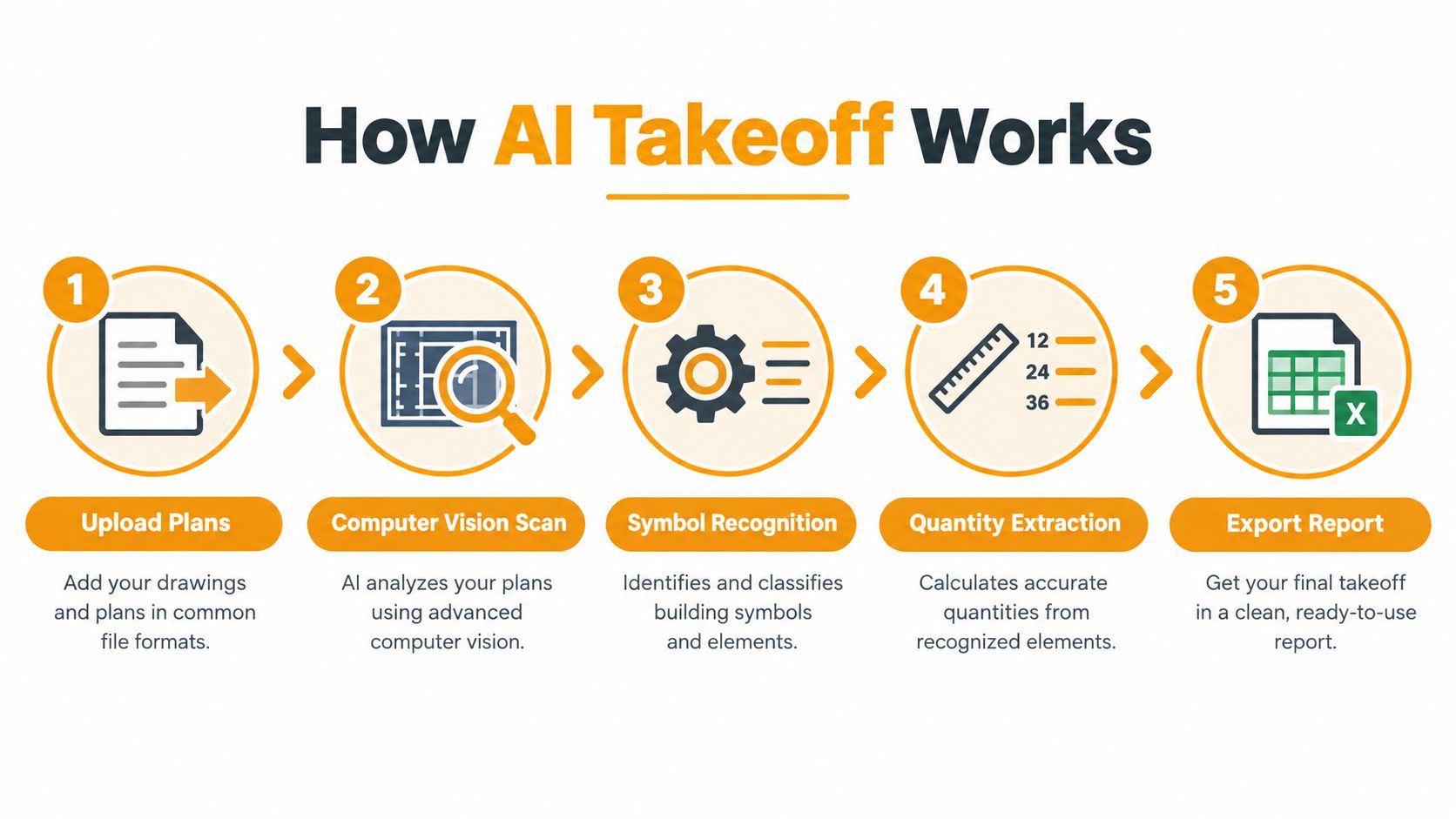
AI takeoff software is a plan-reading system. It ingests architectural or engineering drawings, scans the sheets with computer vision, recognizes symbols, lines, hatches, and annotations, then turns those into measurable quantities an estimator can work with.
On a decent set of vector PDFs, the software can usually find orientation, detect scale, separate pages by discipline, and start identifying countable objects or linear and area conditions. That might mean doors, fixtures, slab edges, wall types, ceiling areas, conduit runs, duct routes, or device counts depending on the trade and the product.
The feature stack that matters
A serious AI takeoff workflow should include most of these functions:
Automatic sheet handling: Upload a plan set and let the system sort pages, read titles, and keep the package together.
Scale and orientation detection: This saves one of the most annoying manual setup steps.
Recognition with confidence flags: Good tools don't just count. They also show what they're uncertain about.
Assembly classification: Raw objects need to map into something estimators can price.
Revision comparison: This is one of the most useful features on active bids because addenda are where time disappears.
Export options: Quantities should move into Excel or estimating workflows without a lot of hand cleanup.
If you're still doing material counts with overlays and disconnected spreadsheets, a cleaner material take off workflow is usually the first benchmark to fix.
A short demo helps if you haven't seen the process in motion yet:
What the estimator still has to do
This software does not remove the estimator. It changes the estimator's job.
The estimator still reviews flagged items, fixes bad detections, checks revision impacts, applies scope interpretation, and decides what belongs in labor, waste, accessories, temporary work, and exclusions. AI can identify a door count. It can't reliably infer your install strategy, local labor conditions, union/non-union assumptions, vendor preferences, or risk posture.
Field rule: Use AI takeoff software to produce the first draft of quantities. Don't let it make bid judgment calls.
There's also a category gap buyers should understand. Some tools answer only "how much is there?" Recent trade coverage describes this as the "takeoff-to-transaction gap", where estimators still have to handle pricing logic, labor rates, assemblies, and proposal creation outside the takeoff tool, as outlined in Riffle's guide to construction takeoff tools in 2026.
That distinction matters. Faster measurement helps. Faster measurement that still leaves the team rebuilding the estimate downstream helps less.
Time Savings Translated Into Money and Bid Capacity
Takeoff speed only matters if it changes what your team can bid and how well they can price it. That's where AI takeoff software becomes a labor-cost lever, not just another line item in the software stack.
One reported test range put manual quantity extraction at 40 to 60 hours per project versus 6 to 8 hours with AI-assisted workflows, with one cited example showing a 12-minute full-plan takeoff that reduced manual hours by 90%, according to Robotics & Automation News coverage of AI estimating software tests. Industry commentary also says bid-preparation time can fall by 40% to 60%, often translating to roughly 10 to 20 hours saved per bid, and noted one GC bidding 3 to 4 projects per month could recover 15 to 25 hours per bid with AI assistance, based on Layer 3 Labs' construction AI estimating commentary.
What those hours actually buy back
Saved hours aren't abstract. They get reallocated into the parts of preconstruction that move margin:
Scope review: catching omissions before they become buyout problems
Supplier coverage: getting one more quote round instead of carrying a rough allowance
Clarifications: sending RFI-style bid questions while there's still time to influence scope
Alternate pricing: preparing options that help win negotiated work
Revision response: absorbing addenda without blowing up the whole week
Metric
Manual Takeoff
AI-Assisted Takeoff
Quantity extraction time
40 to 60 hours per project
6 to 8 hours per project
Full-plan first pass
Measured in workdays
Can be generated in minutes, with one cited run at 12 minutes
Bid-prep workload
More time stuck in counting
40% to 60% less bid-preparation time on standard project types
Calendar effect
Quantities arrive late
More time left for pricing, quotes, and review
Why this changes bid capacity
A preconstruction team doesn't usually lose bids because it can't count. It loses bids because counting ate the schedule. When quantities arrive earlier, estimators can spend their best hours where judgment matters instead of where pixel tracing does.
That's also why market adoption is moving from experiment to operations. One 2026 roundup said 38% of commercial contractors reported measurable AI business impact, up from 17% in 2025, while another cited survey found only 27% of AEC firms currently use AI for automation, problem-solving, or decision-making, according to AI Building Tools' construction estimating market analysis. The category is also scaling commercially. That same analysis cited a 2025 quantity takeoff AI market estimate of $1.8 billion, with a projection to $6.3 billion by 2034 at a 15.2% compound annual growth rate. It said software represented 72.4% of the market and North America held 42.8% of global revenue, or about $770.4 million in 2025.
Bid capacity expands when quantity work stops being the choke point. On teams that are already fed by a steady permit pipeline, each saved takeoff hour compounds because more jobs make it onto the board in the first place.
AI Takeoff Compared With Manual and Permit-Search Workflows
Contractors usually choose among three practical workflows. They do the full takeoff manually from plan sheets. They use a permit-search habit to pull rough project intelligence and infer scope from filings and prior jobs. Or they run AI takeoff on the architect's PDF set and review the output before pricing.
Those approaches solve different problems. They shouldn't be judged by the same standard.
Where each workflow wins
Criterion
Manual Takeoff
Permit-Search Workflow
AI Takeoff
Best use
Final control on difficult scopes
Early project discovery and rough qualification
Fast first-pass quantity extraction on active bids
Main strength
Highest human judgment at every step
Gets teams in front of work earlier
Compresses repetitive measuring and counting
Main weakness
Slow on revisions and large sets
Doesn't capture project-specific assemblies well
Accuracy drops on messy, overlaid, or complex plans
Revision handling
Labor-heavy
Limited, since filings aren't full estimate documents
Useful when the tool can compare drawing versions
Complex MEP or custom geometry
Human can reason through it
Not detailed enough
Needs close review and correction
Output quality
Strong if the estimator has time
Good for pipeline decisions, not final bid scope
Strong as a draft quantity set, not a final bid by itself
Accuracy depends on plan quality
The best technical use case for AI takeoff software is a clean, vector-based architectural or structural set. Independent reporting says performance on that kind of plan commonly lands within about 2% to 4% of a careful manual takeoff, while accuracy degrades on dense MEP, structural complexity, scanned drawings, and irregular geometry, according to Riffle's review of AI takeoff accuracy for subcontractors.
A separate quantitative study found the strongest alignment on count-based items, with bigger variation on area-based and irregular exterior quantities, which is why AI works best as a rapid first pass on repetitive extraction rather than an unchecked final answer, as shown in the commercial-project takeoff study published via EasyChair.
Clean PDF set, repetitive scope, clear symbols. That's where AI earns its keep fastest.
Where permit-search fits, and where it doesn't
Permit-search workflows belong upstream. They help a team find likely jobs, track movement, and decide where to spend estimating attention. They don't replace a quantity workflow once a real plan set hits the desk.
That's the practical split. Manual takeoff gives maximum control but burns time. Permit search gives timing and coverage but not bid-ready quantities. AI takeoff gives speed on the actual drawings, then hands the estimate back to a human before money goes out the door.
Buyer's Checklist and Implementation Steps for Contractors
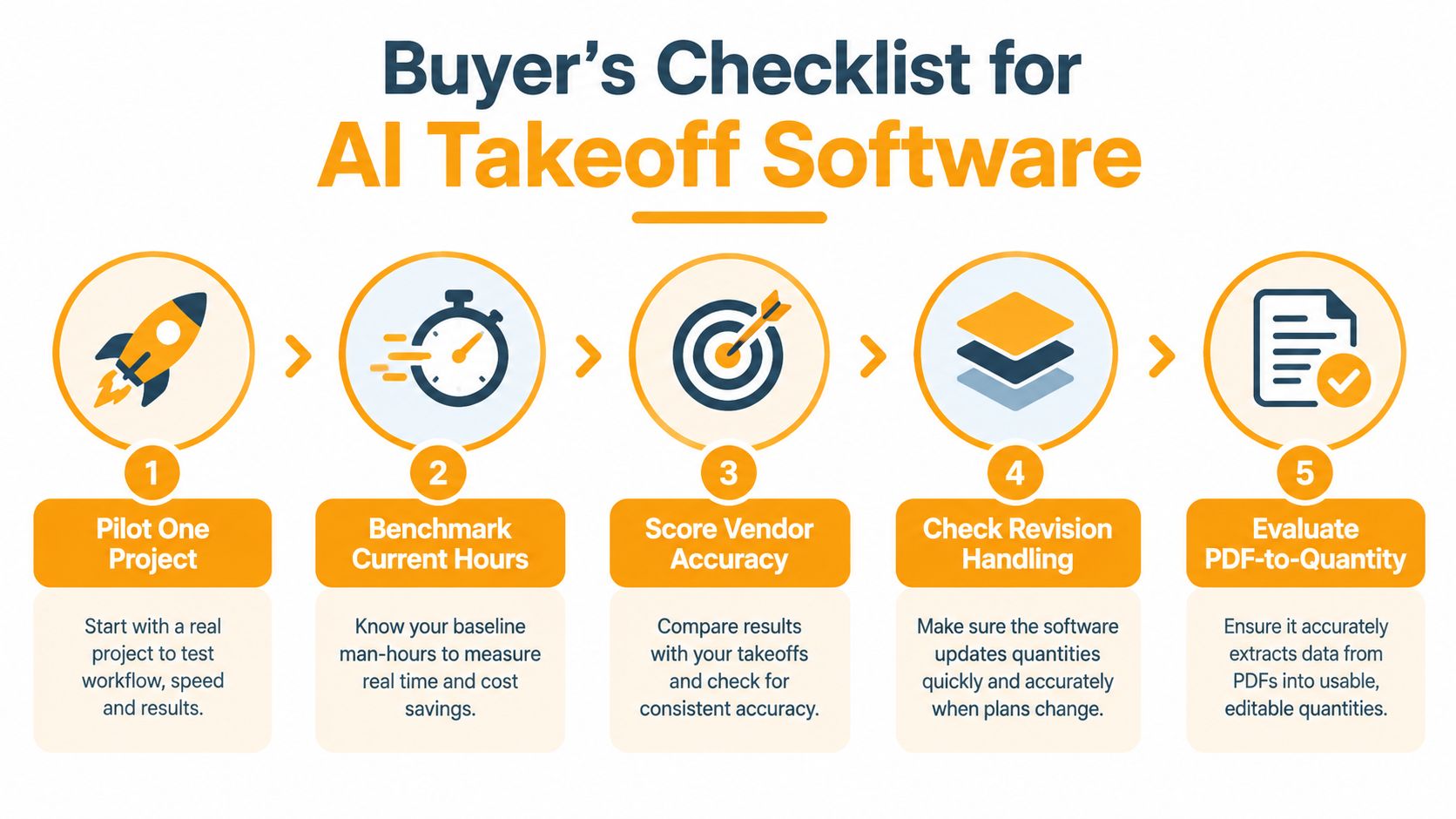
Most buying mistakes happen because a contractor evaluates AI takeoff software on a polished sample file instead of on the ugly work that clogs the team's calendar. Pilot it on a real project, preferably one with revisions, mixed sheet quality, and a scope your estimators know well enough to challenge the output.
What to score during a pilot
Use a simple contractor-focused checklist:
Current-hour baseline Measure how long your team takes now. If you don't know the current takeoff hours, you won't know whether the software helped.
PDF-to-quantity accuracy Test whether the system reads your actual plan types well. Architectural and structural sets are usually the easiest read. Dense trade sheets are where weaknesses show up.
Revision handling Addenda are where software proves itself. If version comparison is weak, your team will still burn hours finding deltas manually.
Assembly usefulness Raw counts aren't enough if estimators still have to rebuild every assembly and cost bucket downstream.
Export friction Check whether quantities move cleanly into Excel and your estimating platform without cleanup that erases the time savings.
Rollout steps that keep the pilot honest
A practical implementation usually looks like this:
Start in a sandbox: Keep the first jobs parallel with the existing process.
Calibrate on past work: Re-run a completed project so estimators can compare AI output against a known manual result.
Train on exceptions: Show the team where to distrust the model, not just how to click through menus.
Define one success metric: Hours saved per bid is usually the cleanest measure.
Review before release: No quantity should go into a live bid without estimator signoff.
One common barrier isn't software quality. It's adoption discipline. Industry analysis citing a 2025 DeWalt study said 44% of construction firms identified skills shortages, specifically the ability to use new technology effectively, as the primary barrier to AI adoption, according to Eano's review of what AI takeoff gets right and where it still falls short.
Pitfalls worth catching early
Skipping the cleanup pass: Fast output still needs human correction.
Trusting bad scans: Overlay-heavy or marked-up sheets produce weaker results.
Expecting pricing intelligence: Many tools stop at quantities.
Ignoring change-order speed: A product that works on base bid sets but struggles on revisions won't help much in live preconstruction.
Houston Market Context and How Platineer Fits the Workflow
In Houston, bid timing matters because work moves through a wide permit and plan-review pipeline before it ever becomes a formal estimating task. Multifamily, tenant improvement, and repair work can surface quickly, and the teams that know about a project early get more room to line up trade interest, understand the site, and decide whether the job fits.
Permit delays also cut directly into schedule pressure downstream. One analysis describes permit delays as adding an average of 15 days to residential project timelines, while a separate benchmark puts permit-related delays at 8.3 business days and about $4,200 per incident when idle time, storage, customer credits, and opportunity cost are included, according to US Tech Automations' permit tracking overview. Another analysis says automation can reduce preventable delay days by 25% to 35% within 90 days and 40% to 50% within 12 months, with estimated total delay reduction of 8 to 13 days per project and a dollar value of $3,040 to $10,920, based on US Tech Automations' permit-tracking ROI analysis.
Why upstream visibility changes the estimate desk
That matters because the estimating bottleneck doesn't start at takeoff. It starts when too many viable jobs arrive too late and all at once. In a Houston workflow, early project intelligence lets a GC or trade contractor decide sooner which projects deserve a real takeoff run and which ones should stay on the watch list.
A connected setup can look like this:
Project intelligence surfaces permit and planning activity early enough to prioritize likely-fit jobs.
Render tools help teams visualize a space or communicate scope before everything is fully developed.
Estimate workflows turn quantity and scope information into something usable for a bid.
One option in that workflow is Platineer, which ties project intelligence to estimating and visualization tools. In practical use, a contractor can monitor early-stage Houston opportunities through permit and planning signals, use Render for plan visualization, and push estimating work toward a more complete bid process through Estimate instead of treating discovery, review, and pricing as separate disconnected tasks.
That connected view is the bigger point. AI takeoff software helps once a plan set exists. But many contractors also need better timing before the drawings hit estimating, because that's what keeps the bid calendar from turning into triage.
From Faster Quantities to Earlier, Better Bids
The advantage of AI takeoff software isn't that the quantity survey happens faster. It's that the estimator gets back into the part of the job where experience pays.
When quantities are ready in hours instead of days, the team can engage earlier in design, ask better questions, and build pricing with more control. That changes the bid calendar. More jobs can be screened before they become fire drills. More due dates get handled without weekend overtime. More estimate effort goes toward strategy, scope review, and supplier coverage instead of repetitive measurement.
What AI should handle, and what it shouldn't
AI should take the first cut at repetitive extraction. The estimator should own:
Scope gaps
Exclusions and clarifications
Means and methods assumptions
Risk review on unclear details
Final bid judgment
That's the right split of labor. Let software move the bottleneck earlier. Let people spend time where mistakes are expensive.
Run one upcoming bid through an AI takeoff pilot and compare it against your normal manual path. The hours saved will show up quickly. So will the misses.
The practical next move
Don't start with a full department rollout. Pick one live project with a real due date and a plan set your team understands. Run AI takeoff as the first pass, review it hard, and compare the total estimator hours, confidence in the final numbers, and how much time remained for pricing and scope review.
Most contractors don't need a theoretical answer after that. They need to see whether the software gave them enough calendar back to build a better bid. That's the test that matters.
Platineer gives contractors a practical way to connect early project discovery with downstream estimating work, especially in Houston where permit timing shapes the bid calendar. If you want to see how project intelligence, Render, and Estimate can support a faster preconstruction workflow around AI-assisted takeoff, visit Platineer.